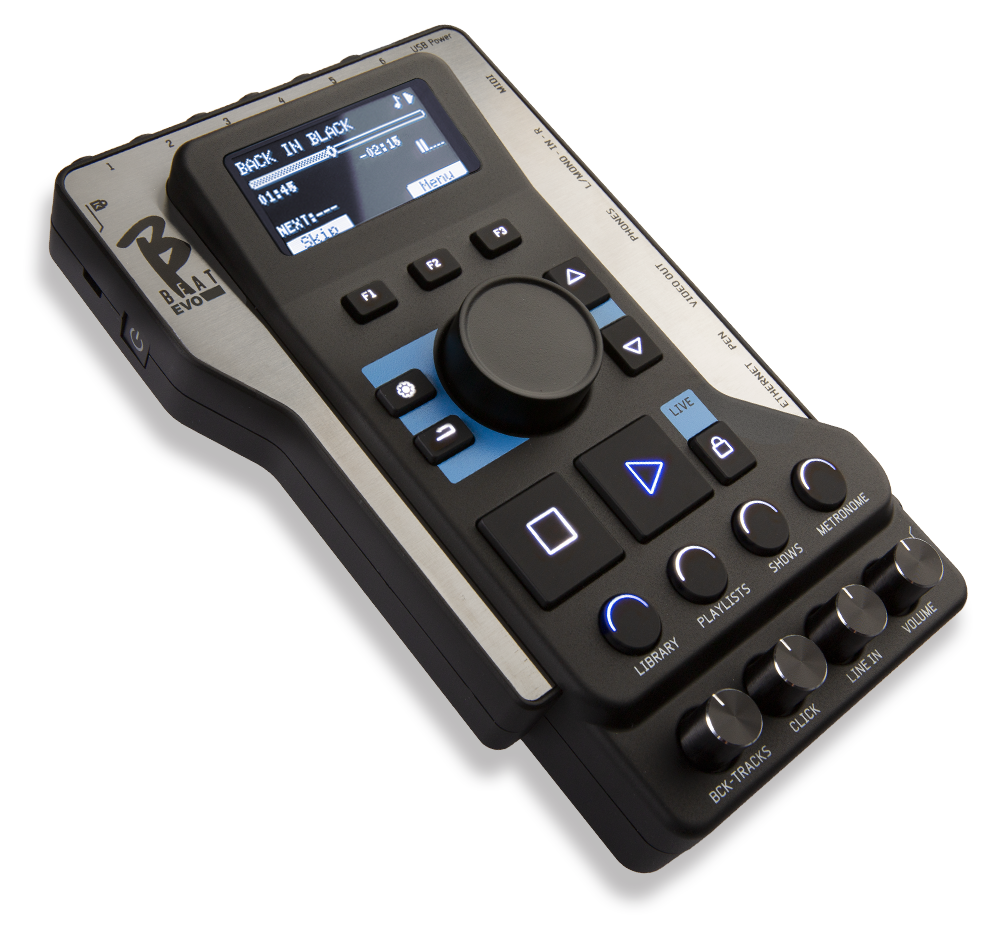

THROUGH B.BEAT
DOWNLOAD VERSION 6.0 of BBeatManager from these links.
If your B.Beat updated to version 6.0, update it to use Lakyx.
BBeatManager 6.0 for Mac (Requires macOS 13 “Ventura” or later)
1. Automatic check for a new release
Connect your B.Beat the network via Ethernet cable or WiFi, in the same way you connect to your computer to transfer backing tracks. If your PC is connected to the Internet, the system will check whether B.Beat updated to the latest release.
If it is not, the software will prompt you to update the system via a pop-up window. The B.Beat update procedureBeat
It is recommended that you keep the versions of B.Beat B.Beat in sync:
VIA USB STICK
N.B. Make sure you don't have any other files named "bbeatSysSw.upd" in your pc's Download folder.
1. Check the software version on the B.Beat
To check the version number currently installed on the machine, simply press theOptionsbuttonandselect INFO.
2. Download the software, version 6.0
– The updated version of the B.Beat firmwareBeat downloaded as a .upd file from this link.
– Once you’ve downloaded the .upd file, copy it to a USB flash drive.
– Remove the USB flash drive from your PC.
3. Update the software on B.Beat
– Turn on B.Beat wait for the main screen to appear.
– Insert the USB stick into the USB port on the B.Beat wait for the update to be recognized. The message "Update found"Beat on the B.Beat display. Press F3.
– The system analyzes the file, and after about 15 seconds, you will be asked to confirm the update. Check that the version is the one above and press F3 again to confirm your choice. If not, cancel to stop the update.
– The update procedure continues automatically and at the end, the B.Beat on its own. Once the restart is complete, remove the USB flash drive.
– Added support for the LAKYX system for managing lights via DMX.
– Minor bugs fixed
– Option to install the B-Loop plug-in (see)
– Improved text editor handling
– Added Fast Mode for the footswitch: disables multiple functions (long press) for faster response
– Added the ability to delete saved Wi-Fi networks
– Fixed minor issues
B.BEAT 4.7.1
BBEATMANAGER 4.7.1 FOR MAC
BBEATMANAGER 4.7.1 FOR WINDOWS
– Added support to GO.8 Synch signal generation.
– Added the ability to manually set the output video resolution in the B.Beat settings.
– Fixed an issue with background image management in SHOWS when switching between two slots.
– Fixed some issues with PDF display in the score manager.
– Fixed an issue with loading images and videos with E.Beat.
– Fixed minor bugs.
- Folder management: It is possible to group some projects within a folder, so that you do not have a long list in the case of many projects. Thus, projects can be found in the main "Home" level (in previous releases) or grouped within a folder. In the BBeat Manager, folders are highlighted on the bar to the left. Existing projects can be moved to folders by selecting them from HOME and clicking on the "folders" icon on the bar.
On BBeat, folders are highlighted with the folder icon: doing ENTER displays the folder's projects, ESC takes you back. Folder playback is not allowed
- Ability to apply changes to a block of text in the text editor. By selecting the affected lines, it is possible to apply minor synchronization changes to these lines with (+) and (-) or simultaneously write time on the input box, set text color and alignment for a single portion.
- Ability to send PLAY and STOP from a connected keyboard via MIDI. There is a new option in MIDI INPUT SETUP for configuring commands. Connectthe keyboard via MIDI to BBeat's USB port using a standard MIDI-USB converter if the keyboard is not USB. Since each keyboard sends its own mapped commands such as PLAY and STOP, BBeat "learns" what the MIDI commands are for PLAY and STOP (in the options, MIDI input setup). It is a kind of advanced "pedal" that includes PLAY and STOP.
– It is possible to mute a family and keep the configuration stored even after subsequent power-ups.
– Added the ability to change the background image directly from B.Beat in the System > Options > Background Image menu.
– Added the ability to keep the fan always on from B.Beat System > Options > Fan Mode menu. (Always On or Auto)
– Reduces or eliminates unexpected audio noise. If the project has videos andgenerates audio noise, it is best to reload these video files.
- Fixes impromptu problems that caused crashes.
- Adjust the size of some characters in the playlist to accommodate longer writings.
BBEATMANAGER 4.5.1 FOR MAC
BBEATMANAGER 4.5.1 FOR WINDOWS
- Decreased reaction time on PLAY with projects containing video.
- Added the ability to manage a text-only project without music (hump management for unplugged songs)
– Added the ability to remotely control B.Beat your PC as well as from the Prompter app
– Added text coloring and alignment for single lines (only on video output).
– Enhanced and accelerated detection between PC and B.Beat between Prompter and B.Beat.
– Fixed occasional freezing issues with MIDI files and added option to mute MIDI sounds at STOP and PAUSE (disabled by default).
– Fixed bugs related to score management with Prompter.
- Fixed minor bugs
Release date March 20, 2024
BBEATMANAGER 4.0.4 FOR WINDOWS
– Expansion mode management implemented. It is possible to connect two devices together via Ethernet cable, where the second device acts as an output expansion for the first. You can connect a B.Beat to a B.Beat X, and a B.Beat to another B.Beat as an expansion.
- Improved Sync management between Main and Spare machine
- Implemented new system for "Live Mode" to have more control and safety during a show
- Added support for creating backup and restore from USB flash drive, important for use with E.Beat
- Added in Options the ability to lock output volume at different levels (+0 dBu, +4 dBu, +10 dBu) or leave it manual with poteziometers. Fixed vu meters display error.
- Added display of the current project number playing in a playlist.
- Pressing the Esc key while a playlist is playing can be used to access its list of playing tracks.
Fixed minor bugs
- problems with very long tracks
- problems related to erasing and duplicating tracks in some circumstances
- Automatic memory restore in case of errors
- problems in routing outputs in PRO in some circumstances fixed levels in headphones
- problems related to commands sent from remote control
– Ability to manage expansions with B.Beat X and all other types of combinations.
– Added the ability to use the E.Beat pluginplugin, software that allows offline management of B.Beat family machines. This plugin allows you to make a backup copy on a USB stick and use this stick to make changes, additions, deletions, or anything else you want to do with B.Beat. Once you have made the changes, insert this stick into the B.Beat it will align the changes made offline.
The plugin is available for a fee.
- Chinese language added
- Added manual editing of track volume value (with PC keyboard), alphabetically sorted projects in lists (not playlists). Enhanced generally the usability of the user interface.
- When importing, putting the output number in front of the track name (e.g. 01 - Guitars.wav" ) automatically assigns the output number
– Added the option to manually set the B.Beat network addressBeat case of automatic connection issues.
Fixed minor bugs
- In Backup management. In particular, changing the destination of the backup works.
- In moving (dragging) tracks within an audio project
- Enhanced error handling when loading tracks
BBeatManager 3.0.5 for Windows
1.Automatic check of a new release
Implemented synchronization between two machines (Main/Spare mode). If a second machine is configured as SPARE, once connected to the first machine (MAIN) with the Ethernet network cable, the SPARE machine will ask to align with the first one. If you agree (it is asked 2 times) the SPARE machine is completely reset and is cloned to the first one: the second machine will be identical to the first one. If you keep the cable connection the second one is perfectly synchronized with the first one and can be used as SPARE with a switch device for hot backup during a show.
Added ability to display the lyrics (lyrics) on HDMI video output as well. It will be possible to choose to display on the HDMI output either the videos accompanying the projects or the lyrics (lyricis). The choice is a machine setting and you cannot change from project to project: either video or lyrics.
Remote control: using a cell phone or tablet, with the Prompter app you can now control the B.Beat via WiFiBeat it must be LE or equipped with M-Live's M-Pen WiFi, and the Prompter must be on the same network).
Reduced latency when executing the PLAY command. If the song is preloaded, playback starts almost instantly.
Automatic recovery system added: if memory errors are detected that prevent the B.Beat from starting up, an internal diagnosis and recovery procedure is initiated to automatically resolve the issue.
Other features:
Volumes are in dB, and up to +6 dB gain is possible on the tracks.
It is now possible to assign a name to the device in the B.Beat Options. The name will be displayed when connecting.
Added the ability to view long project titles (by pressing Enter on the project name)
Fixed bug on MIDI clock
Fixed bugs related to project duplication and deletion from shows
Fixed problem with transitions between slots in some configurations
Fixed metronome configuration issues within a show
Fixed bug where deleting/inserting a MIDI file would not delete the text associated with the project. If there is text in the MIDI, however, it is overwritten.
Legal and operational headquarters:
Via Luciona, 1872/B
San Giovanni in Marignano (RN) 47842
Switchboard hours:
Monday through Friday 9:30 a.m. to 1 p.m.
and 2 p.m. to 5:30 p.m.
Technical support hours:
Monday through Friday 10 a.m. to 1 p.m.