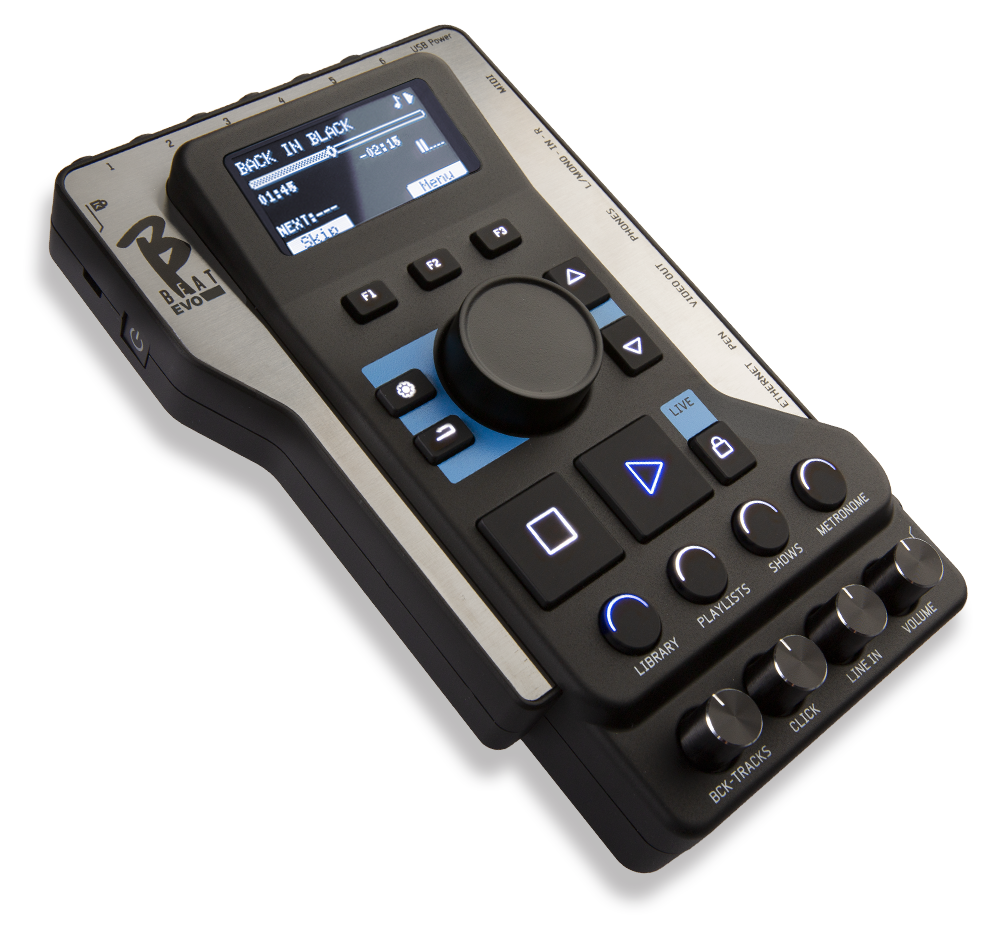

DOWNLOAD VERSION 6.0 of BBeatManager from these links.
If your B.Beat isn't updated to version 6.0, update it to use Lakyx.
BBeatManager 6.0 for Mac (Requires macOS 13 “Ventura” or later)
1. Automatic check for a new release
Connect your B.Beat the network via Ethernet cable or WiFi, in the same way you connect to your computer to transfer backing tracks. If your PC is connected to the Internet, the system will check whether B.Beat updated to the latest release.
If it is not, the software will prompt you to update the system via a pop-up window. The B.Beat update procedureBeat
It is recommended that you keep the versions of B.Beat B.Beat in sync:
VIA USB STICK
N.B. Make sure you don't have any other files named "bbeatProSysSw.upd" in your pc's Download folder.
1. Check the software version on the B.Beat 16
To check the version number currently installed on the machine, simply press theOptionsbuttonandselect INFO.
2. Download the software, version 6.0
– The updated version of the B.Beat firmware can be downloaded as a .upd file from this link.
– Once you’ve downloaded the .upd file, copy it to a USB flash drive.
– Remove the USB flash drive from your PC.
3. Update the software on B.Beat
– Turn on the B.Beat wait for the main screen to appear.
–Insert the USB stick into the USB port of the B.Beat and waituntil the update stick is recognized. The message "Update found" appears on the display of the B.Beat . Press F3.
– The system analyzes the file, and after about 15 seconds, you will be asked to confirm the update. Verify that the version is the one above and press F3 again to confirm your choice. If not, cancel to stop the update.
– The update procedure continues automatically and at the end, the B.Beat restarts on its own. Once the restart is complete, remove the USB flash drive.
What's New in Software Version 6.0:
Release Date: July 30, 2026
– Added support for the LAKYX system system for DMX lighting control.
– Minor bugs fixed
Release date: May 8, 2026
B.Beat 5.0.4 for Windows
B.Beat 5.0.4 for Mac
B.Beat 5.0.6
– Added the ability to create audio loops within a single project (“markers and loops” feature)
– Added the ability to manage electric guitar models without having to edit an external file (the “Ampsims” feature)
– Added the ability to use a three-band equalizer for each of the first 16 tracks (not on “expansion” tracks)
– Advanced video management:
* Added the ability to manage fade-ins and fade-outs on videos
* Added the ability to automatically extract the audio track from a video
* Ability to manage the video start time with a delay or advance relative to the assigned audio project
– Family management with automatic output assignment
– Ability to transpose project tracks in B.Beat (transpose)
– Ability to remove vocals, drums, bass, and other instruments from an MP3 track (stem remover)
– Added compatibility with the MBC foot controller
– Improved management of the lyrics editor
– Added Fast Mode for the pedal: disables multiple functions (long press) for greater responsiveness
– Introduced deletion of saved WiFi networks
– Fixed minor issues
– Fixed issues with SHOWs and playlists
Many of the advanced features listed above are common with those of B.Beat Plus and are described in that manual.
You can download the manual from this page.
Release date March 26, 2025.
B.Beat 4.7.1 for Windows
B.Beat 4.7.1 for MAC
B.Beat 4.7.1
– Added support to GO.8 Synch signal generation.
– Added the ability to manually set the output video resolution in the B.Beat settings.
– Fixed an issue with background image management in SHOWS when switching between two slots.
– Fixed some issues with PDF display in the score manager.
– Fixed an issue with loading images and videos with E.Beat.
– Fixed minor bugs.
Release date September 10, 2024
B.Beat 4.6.2 for Windows
B.Beat 4.6.2 for MAC
B.Beat 4.6.3
- Folder management: it is possible to group some projects within a folder, so that you do not have a long list in the case of many projects . Thus, projects can be found in the main "Home" level (in previous releases) or grouped within a folder. In the BBeat Manager, folders are highlighted on the left bar. Existing projects can be moved to folders by selecting them from HOME and clicking on the "folders" icon on the bar.
On BBeat, folders are highlighted with the folder icon: doing ENTER displays the folder's projects, ESC takes you back. Folder playback is not allowed
- Ability to apply changes to a block of text in the text editor. By selecting the affected lines, it is possible to apply minor synchronization changes to these lines with (+) and (-) or simultaneously write time on the input box, set text color and alignment for a single portion.
- Ability to send PLAY and STOP from a MIDI-connected keyboard. There is a new option in MIDI INPUT SETUP for configuring commands. Connect the keyboard via MIDI to BBeat's USB port using a standard MIDI-USB converter if the keyboard is not USB. Since each keyboard sends its own mapped commands such as PLAY and STOP, BBeat "learns" what the MIDI commands are for PLAY and STOP (in the options, MIDI input setup). It is a kind of advanced "pedal" that includes PLAY and STOP.
– It is possible to mute a family and keepthe configuration stored evenafter subsequent power-ups.
– Added the ability tochange the background image directly fromBeat B.Beatin the System > Options > Background Image menu.
– Added the ability to keep thefan always onfrom the B.Beat System > Options > Fan Mode menu (Always On or Auto).
- The LINE IN input of the PRO can also be used with only one cable (MONO), and the signal is put in the center in stereo in the headphones. It must be configured in the Options (MONO LINE IN)
- Reduces or clears of impromptu audio noise. If the project has videos and if the project generates audio noise, it is best to reload these I video files.
- Fixes impromptu problems that caused crashes.
- Adjust the size of some characters in the playlist to accommodate longer writings.
Release date May 29, 2024.
Reduced reaction time on PLAY with projects containing video
Added the ability to manage a text-only project without music (management of teleprompter for unplugged songs)
Added the ability to remotely control B.Beat a PC as well as from the Prompter app
Added text coloring and alignment for single lines (only on video output)
Enhanced and accelerated detection between PC and B.Beat between Prompter and B.Beat
Fixed occasional freezing issues with MIDI files and added option to mute MIDI sounds at STOP and PAUSE (disabled by default)
Added volume control when the device operates as a sound card. The "Output Level" setting is maintained.
Fixed bug that occasionally would not start the video in playlist and show
Release date March 20, 2024
Expansion mode management implemented. It is possible to connect two devices together via Ethernet cable, where the second device acts as an output expansion for the first. You can connect a B.Beat PRO to a B.Beat X, and a B.Beat PRO to another PRO.
Improved Sync management between Main and Spare machine
Implemented new system for "Live Mode" to have more control and safety during a show
Added support for creating backup and restore from USB stick, important for use with E.Beat
Added in Options the ability to lock output volume at different levels (+0 dBu, +4 dBu, +10 dBu) or leave it manual with poteziometers. Fixed vu meters display error.
Adding display of the current project number playing in a playlist.
Pressing the Esc key while a playlist is playing can access its list of playing tracks.
Fixed minor bugs
- problems with very long tracks
- problems related to track deletion and duplication in some circumstances
- Automatic memory restore in case of errors
- problems in output routing in PRO in some circumstances fixed levels in headphones
- problems related to commands sent from remote control
Ability to manage expansions with B.Beat X and all other types of combinations.
Added the ability to use the E.Beat pluginplugin, software that allows offline management of B.Beat family machines. This plugin allows you to make a backup copy on a USB stick and use this stick to make changes, additions, deletions, or anything else you want to do with B.Beat. Once you have made the changes, insert the stick into the BBeat and it will align the changes made on the offline stick.
The plugin is available for a fee.
Chinese language added
Added manual editing of track volume value (with PC keyboard), alphabetically sorted projects in lists (not playlists). Enhanced generally the usability of the user interface.
When importing, putting the output number in front of the track name (e.g. 01 - Guitars.wav" ) automatically assigns the number of the 'output
Added the ability to manually define BBeat's network address in case of automatic connection problems.
Fixed minor bugs
- In Backup management. In particular, changing the destination of the backup works.
- In moving (dragging) tracks within an audio project
- Enhanced error handling when loading tracks
Software released with the release of the machine
Legal and operational headquarters:
Via Luciona, 1872/B
San Giovanni in Marignano (RN) 47842
Switchboard hours:
Monday through Friday 9:30 a.m. to 1 p.m.
and 2 p.m. to 5:30 p.m.
Technical support hours:
Monday through Friday 10 a.m. to 1 p.m.